The best meal planning app depends on the way you cook. Some apps help you discover recipes and order ingredients; others focus on collecting your own recipes, sharing them with family or building meals around calorie targets. This comparison explains what each option is designed to do so you can choose a workflow that fits your household.
Meal planning apps: features and prices compared
Compare the features tested in each app, free-tier limits, Premium requirements and current prices. Details below each Yes/No label explain quotas, trials, ads and paid features.
| Feature / criterion | Mealz | Stashcook | Samsung Food | Weekly Meal Planner - JoJo Apps | Plan to Eat | Paprika | Eat This Much |
|---|---|---|---|---|---|---|---|
| Built-in recipe library | YesBuilt-in recipe library. | NoPersonal collections; no preloaded recipe library. | YesBuilt-in recipe catalogue. | YesBuilt-in recipe library. | NoNo preloaded library; the planner centers on recipes you add. | NoPersonal recipe collection; no preloaded recipe catalogue. | YesRecipes are included in its meal planner. |
| Manual recipe creation | YesUp to 23 recipes can be created free; Premium is required beyond the free limit. | YesUp to 8 free recipes; Premium needed beyond the free limit. | YesUnlimited manual recipe creation. | YesUp to 20 free recipes; Premium needed beyond the free limit. | YesRecipe creation is available during the 14-day free trial; subscription required afterward. | YesFree Android version is limited to 50 recipes; paid unlock for full access. | YesUnlimited manual recipe creation in the free tier. |
| Recipe imports | YesWeb, photos and cookbook pages; 5 free imports, then Premium. | YesWeb/social links and photos; free imports are limited. | YesWeb imports are free; photo imports limited to 3 in the free offer. | YesRecipe URLs and photos; Premium required. | YesWeb and photo imports are available during the 14-day trial. | YesWeb recipe imports available in the free Android version. | YesUnlimited web recipe import in the free tier. |
| AI recipe creation | Yes3 free AI recipe creations, then Premium. | YesAI recipe creation is available with a free limit. | NoNo new recipe creation from an AI prompt in the tested version. | NoNo new recipe creation from an AI prompt in the tested version. | NoNo AI generation of new recipes from a prompt in the tested version. | NoNo new recipe creation from an AI prompt in the tested version. | NoNo new recipe creation from a description in the tested version; automatic meal plans are a separate feature. |
| Meal planning | Manual and automaticManual planning is free; automatic planning requires Premium. | ManualManual planning is free; custom dates require Premium. | Manual and automatic3 free manual plans and 2 free automatic plans; paid offer after the free quota. | Manual and automaticManual planning is free; automatic plans require Premium. | ManualManual planner available during the 14-day trial; subscription required afterward. | ManualManual planning is available in the free version. | Manual and automaticManual planning free for the current day; automatic planning requires Premium. |
| Automatic shopping list | YesAutomatic generation is free; sort by aisle or recipe and customize aisles. | YesFree automatic list, organized by aisle. | YesFree automatic list generation; organize by aisle or recipe. | YesAutomatic list generation requires Premium; items are sorted alphabetically. | YesShopping list available during the 14-day trial; subscription required afterward. | YesFree automatic list; organize by aisle or recipe. | YesShopping lists require Premium. |
| Sharing and sync | YesMenu/list sharing and sync require Premium; recipe sharing is free. | YesSharing and sync require Premium. | YesSharing and sync are free. | YesSharing and sync require Premium. | YesSharing and sync available during the 14-day trial; subscription required afterward. | YesCloud sync requires a paid upgrade; apps are purchased separately by platform. | YesSharing and sync available free. |
| Loyalty cards | YesAdd 3 loyalty cards free by scanning. | NoNo loyalty-card feature reported in the test. | NoNo loyalty-card feature reported in the test. | NoNo loyalty-card feature reported in the test. | NoNo loyalty-card feature reported in the test. | NoNo loyalty-card feature reported in the test. | NoNo loyalty-card feature reported in the test. |
| Step-by-step cooking | YesStep-by-step cooking mode available. | YesStep-by-step cooking requires Premium. | YesGuided step-by-step recipes. | YesStep-by-step cooking mode available. | YesStep-by-step cooking available during the 14-day trial. | NoNo step-by-step cooking mode reported in the test. | YesStep-by-step cooking mode available. |
| Printing | YesPrint plans, recipes and shopping lists; Premium required. | YesRecipe printing requires Premium. | YesRecipe printing is free. | YesRecipe printing available. | YesPrint plans, recipes and shopping lists during the trial. | YesPrinting plans, recipes and shopping lists is available. | YesPrinting plans, recipes and shopping lists requires Premium. |
| Ads in the free version | NoNo ads observed during testing. | YesAds are included in the free version. | NoNo ads observed during testing. | NoNo ads observed during testing. | NoNo ads observed during testing. | NoNo ads observed during testing. | NoNo ads observed during testing. |
| Free tier / trial | Free to use; includes a 7-day Premium trial. | Limited free tier with ads; Premium is optional, with a 7-day free trial. | The base app is free; Samsung Food+ is optional, with a 7-day free trial. | Free to use, with optional Premium. | 14-day trial only; a subscription is required after the trial. | Free Android tier capped at 50 recipes; paid upgrade unlocks full access and Cloud Sync. | Free tier available; automatic planning and some shopping features require Premium. A 14-day free Premium trial is available. |
| Platforms | Android (Google Play). | Android · iPhone/iPad. | Android · iPhone/iPad · Web. | Android · iPhone/iPad. | Android · iPhone/iPad · Web. | Android · iPhone/iPad · macOS · Windows. | Android · iPhone/iPad · Web. |
| Premium price / business model | Premium: $1.99/month · $14.99/year · $29.99 lifetime. | Premium: $7.99/month · $29.99/year. Official pricing. | Samsung Food+: $6.99/month · $59.99/year (US pricing). | Premium: $1.99/month · $12.99/year · $17.99 lifetime. | Official US website: $5.95/month or $49/year after the 14-day trial. Official pricing. App-store prices may differ. | One-time app purchase: $4.99 (US price; platform prices may differ). | US website Premium starts at about $5/month with annual billing. Official website. App-store pricing may differ. |
Yes/No indicates feature availability; for meal planning, the label specifies the mode (manual, automatic or both). Details show free limits, Premium requirements, ads, trials and prices. Prices checked in October 2026. Subscription prices may vary by country, platform and promotional offer. Website prices and Google Play prices may differ.
Google Play installation thresholds are global, not country-specific usage figures. Ratings, pricing, subscriptions and grocery integrations may vary by market and platform.
Which app fits the way you cook?
You want help deciding what to eat
Mealz can suggest a plan using your previous menus and planning habits, while letting you edit it. JoJo Apps emphasizes plans based on available ingredients and dietary preferences. Eat This Much approaches automation differently by targeting calories and macronutrients. These are different kinds of automation, so think about what you want the app to optimize for.
You save lots of recipes from social media
Stashcook is particularly focused on collecting recipes from social platforms, and YouMealPlan also emphasizes AI-assisted extraction from social links. Mealz supports compatible imports from web and social sources as well as photos and cookbook pages. Import results can depend on how each source presents its recipe, so it is worth checking imported ingredients and steps.
You already have a large personal recipe collection
Plan to Eat and Paprika are designed around organizing and planning from your own recipes. My Recipe Box is another relevant option in markets where it is available. Mealz also lets you build your own collection, while adding an in-app recipe library and AI recipe generation as additional ways to start.
You want detailed nutrition targets or grocery delivery
Eat This Much is a stronger fit if calorie and macronutrient targets are central to your meal plan. Samsung Food also highlights nutrition information. In contrast, Mealz focuses on organizing meals and shopping rather than calculating a calorie-targeted diet. Online grocery ordering is available in some apps and markets, but Mealz creates a list for shopping rather than providing a built-in checkout or delivery service.
Why choose Mealz?
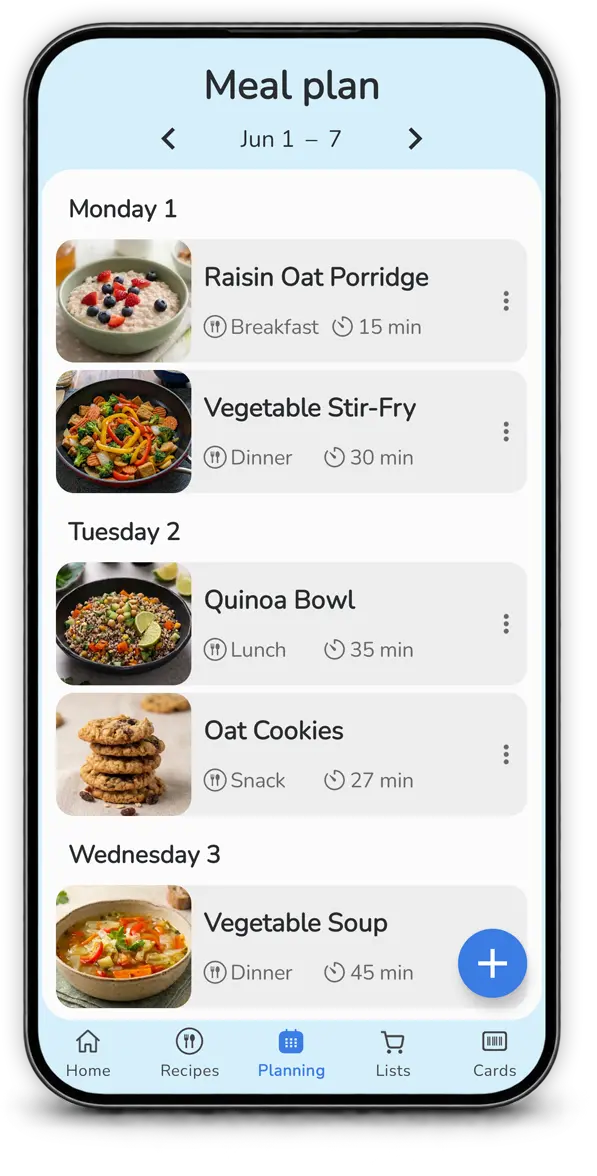
Mealz connects recipes, planning and shopping in one app. Its built-in recipe library can be supplemented with your own recipes: import them from the web or cookbooks, or create a new recipe from a description with AI. Plan meals manually, repeat dishes you enjoy, or use an automatic suggestion based on your habits and previous menus. Mealz then creates a shopping list organized by aisle, with customizable aisle order, colors and icons. You can also share and sync menus, recipes and lists, with offline access. Mealz is a good fit if you want to simplify the entire process, rather than focus on nutrition tracking or online grocery delivery.
Each app in more detail
Stashcook: collect recipes from social media
Stashcook is a strong option if your recipe inspiration comes from TikTok, Instagram, Pinterest, YouTube and other online sources. It focuses on capturing those recipes, organizing them and sharing them with a household, with a manual weekly planner and a shopping list. Mealz overlaps on recipe imports but adds a built-in recipe library and AI generation from a description, plus automatic plan suggestions based on previous menus and habits.
Samsung Food: discovery and guided cooking
Samsung Food brings together a large recipe catalogue, website imports, ingredient-based search, meal planning, guided cooking and nutrition details. It is worth considering if you enjoy discovering new recipes and want nutrition information as part of that process. Mealz puts more emphasis on your planning habits, AI recipe creation and a shopping list whose aisle order and appearance you can customize.
Weekly Meal Planner - JoJo Apps: plans based on ingredients and preferences
JoJo Apps highlights automatic menu suggestions based on available ingredients and dietary needs, together with a pantry, expiry tracking, recipe imports and shopping lists. It is a direct comparison for users who want their menu shaped by what is already available at home. Mealz instead emphasizes planning from previous menus and habits, recipe generation from a description, its integrated library and customizable shopping aisles.
Plan to Eat: organize recipes you already use
Plan to Eat focuses on adding recipes, importing them from the web and arranging them in a calendar, with a shopping list built from the plan. It is a good fit for users who like hands-on control over their own recipe collection. Mealz offers that manual control too, and adds a built-in recipe library, AI recipe generation and automatic suggestions based on previous planning habits.
Paprika: detailed recipe management and pantry tools
Paprika emphasizes importing recipes from the web, organizing a personal recipe book, planning meals, combining ingredients into aisle-grouped shopping lists and tracking pantry items or expiry dates. It also highlights printing and offline access. These are meaningful strengths, especially for cooks who want detailed manual control. Mealz focuses more on combining built-in recipes, AI recipe creation and habit-based automatic planning in one workflow.
Eat This Much: nutrition-targeted meal plans
Eat This Much has a more specialized purpose: it generates meal plans around calorie and macronutrient targets, dietary preferences and other nutrition goals. If those targets are the main reason you use a planner, it deserves a close look. Mealz is intended for everyday meal organization—recipes, plans and shopping lists—rather than serving as a calorie or macro tracking system.
How this comparison was put together
Mealz is published by the team behind this article, and that relationship is disclosed for transparency. We installed and tested the apps compared on Android, checking recipe entry/import, meal planning, shopping-list generation, sharing/sync, step-by-step cooking and printing where those features are available. We also recorded free-tier limits and the features that require Premium.
Prices shown are the French-market offers recorded on October 17, 2026, for the French article, and US prices where verified for this English article. Promotional offers, prices, limits and features can change by version, country and purchase channel. In the table, “Yes” means the feature was available in the tested version; details explain free quotas, ad-supported access or Premium requirements. “No” means the feature was not available in the tested flow.
The selection represents different workflows: collecting recipes from social media (Stashcook), recipe discovery and nutrition (Samsung Food), planning around ingredients and preferences (Weekly Meal Planner - JoJo Apps), manual recipe organization (Plan to Eat and Paprika), and calorie-targeted plans (Eat This Much). Prices and features should be rechecked before future updates.
Frequently asked questions
Which app is best for automatic meal planning?
It depends on what you want the automation to do. Mealz can suggest a plan based on your planning habits and previous menus. JoJo Apps emphasizes plans based on available ingredients and dietary preferences, while Eat This Much focuses on calorie and macronutrient targets. These approaches are different rather than interchangeable.
Which meal planning app is best for saving personal recipes?
Paprika and Plan to Eat are strongly oriented around organizing your own recipe collection. Mealz combines an in-app recipe library with manual entry, supported imports and AI-generated recipes.
Which apps can import recipes from social media?
Stashcook focuses on saving recipes from social platforms, websites, photos and text. Mealz also supports imports from compatible web sources and photos/cookbook pages, with free limits described in the table. Import success depends on the source and its format.
Does Mealz calculate calories and macronutrients?
Mealz focuses on organizing recipes, meal plans and shopping lists. It does not currently provide the same built-in calorie and macronutrient planning focus as Eat This Much or nutrition tools described by some other apps.
Do all meal planning apps include grocery lists?
Many apps in this comparison create grocery lists from recipes or planned meals. Aisle sorting, household sharing, personalization and online ordering vary by app and region.
Are all features included for free?
No. Mealz is free to use and includes a 7-day Premium trial; some features have free quotas before Premium is required. JoJo Apps and other listed apps also offer free access with optional paid features, while Plan to Eat is limited to a 14-day trial. The table above summarizes the free tiers, ad-supported access, trial limits and prices recorded for each app.
Official app listings
Check the official store pages for current availability, features and offers in your region: Mealz, Stashcook, Samsung Food, Weekly Meal Planner - JoJo Apps, Plan to Eat, Paprika and Eat This Much. The “platform/pricing source” links in the table point to official pages used to verify supported platforms and, where published, pricing.